Cut & RUN footprinting
usage: cut_run_footprint.py [-h] [-j JID] -f INPUT_TSV [-q MINMAPPINGQUALITY]
                            [--maxFragmentLength MAXFRAGMENTLENGTH]
                            [--Liu_Nan_pipeline_path_atactk LIU_NAN_PIPELINE_PATH_ATACTK]
                            [--Liu_Nan_pipeline_path_root LIU_NAN_PIPELINE_PATH_ROOT]
                            [-g GENOME] [--genome_fasta GENOME_FASTA]
                            [-b BLACK_LIST] [-s CHROM_SIZE] [-m MOTIF_FILE]
                            [-l MOTIF_LIST]

optional arguments:
  -h, --help            show this help message and exit
  -j JID, --jid JID     enter a job ID, which is used to make a new directory.
                        Every output will be moved into this folder. (default:
                        cut_run_footprint_yli11_2019-07-23)
  -f INPUT_TSV, --input_tsv INPUT_TSV
                        TSV file, 3 columns, peak, bam, output, need absolute
                        path to file (default: None)
  -q MINMAPPINGQUALITY, --minMappingQuality MINMAPPINGQUALITY
  --maxFragmentLength MAXFRAGMENTLENGTH
  --Liu_Nan_pipeline_path_atactk LIU_NAN_PIPELINE_PATH_ATACTK
                        not for end-user (default: /home/yli11/Programs/cut_ru
                        n_pipeline_Nan_Liu/git/atactk/scripts)
  --Liu_Nan_pipeline_path_root LIU_NAN_PIPELINE_PATH_ROOT
                        not for end-user (default:
                        /home/yli11/Programs/cut_run_pipeline_Nan_Liu)

Genome Info:
  -g GENOME, --genome GENOME
                        genome version: hg19, mm10, mm9 (default: hg19)
  --genome_fasta GENOME_FASTA
                        genome version: hs, mm (default:
                        /home/yli11/Data/Human/hg19/fasta/hg19.fa)
  -b BLACK_LIST, --black_list BLACK_LIST
                        Blacklist file (default: /home/yli11/Data/Human/hg19/a
                        nnotations/hg19.blacklist.bed)
  -s CHROM_SIZE, --chrom_size CHROM_SIZE
                        chrome size (default: /home/yli11/Data/Human/hg19/anno
                        tations/hg19.chrom.sizes)

Motif Info:
  -m MOTIF_FILE, --motif_file MOTIF_FILE
                        genome version: hg19, mm10, mm9 (default:
                        /home/yli11/Data/Motif_database/Human/human.meme)
  -l MOTIF_LIST, --motif_list MOTIF_LIST
                        genome version: hg19, mm10, mm9 (default:
                        /home/yli11/Data/Motif_database/Human/jaspar_motif.list)
Summary
This pipeline uses the footprint.sh code from https://bitbucket.org/qzhudfci/cutruntools/src/6e399d20e051ee950c3c17d8d5cf8092c3c2a558/USAGE.md.
This pipeline is also deposited at: https://github.com/YichaoOU/cut_run_footprinting
This pipeline takes in a bam file and a narrowPeak file (or any bed file), generate footprint figures for all motifs identified by Homer, including known motifs.
Only properly-paired reads are used. Users can control maximal fragment size, default is 150bp. For CUT & RUN, some people also use 120bp. You can also use a big number, like 9999, in that case, all sizes of fragment will be used. I haven't tested differences between fragment sizes.
Example data (only HBG regions in chr11) can be found here:
module load python/2.7.13

cd /home/yli11/Pipelines/example_NGS_data/cut_run/cut_run_yli11_2019-04-10

cut_run_footprint.py -f input.list
Interpreting results
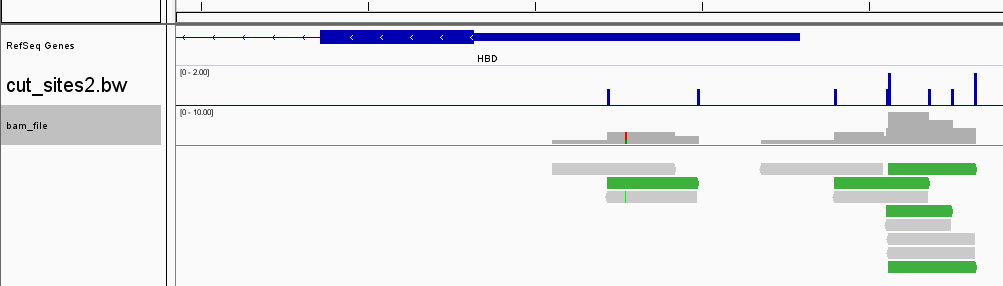
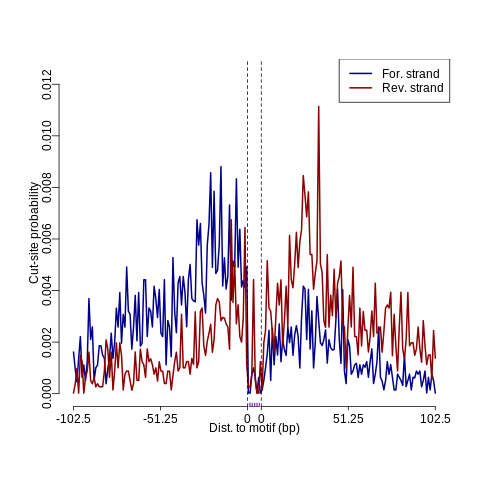
Unlike ATAC-seq or DNase-seq where enzymes cut/digest all naked DNA (i.e., unbound by TFs or nucleosome-free), CUT&RUN uses an antibody to specifically target a TF, therefore, the cutting only occurs nearby the TF binding sites. Therefore, we can be confident about targeted TF footprints if we see valleys on cut-probability figures, however, we should be cautious about its co-factors’ results. We can see if footprint results are similar in different replicates. Also, we can look at the cut_sites.bw generated by this pipeline and see if we can see the valleys on our regions of interest.
By default, we only use paired-reads where fragment size <= 150bp. Not all co-factors can interact with the target TF in this short region. You can relax this parameter --maxFragmentLength if you are really interested in some TFs that don’t show strong footprints using the default 150bp.
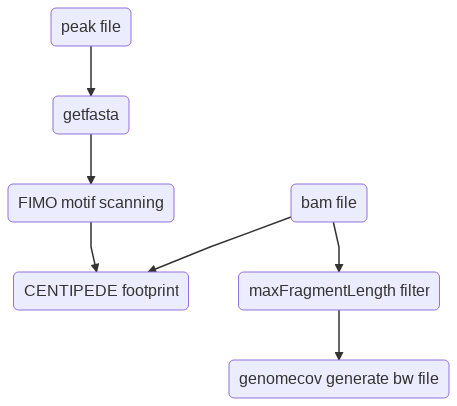
Flowchart
Example
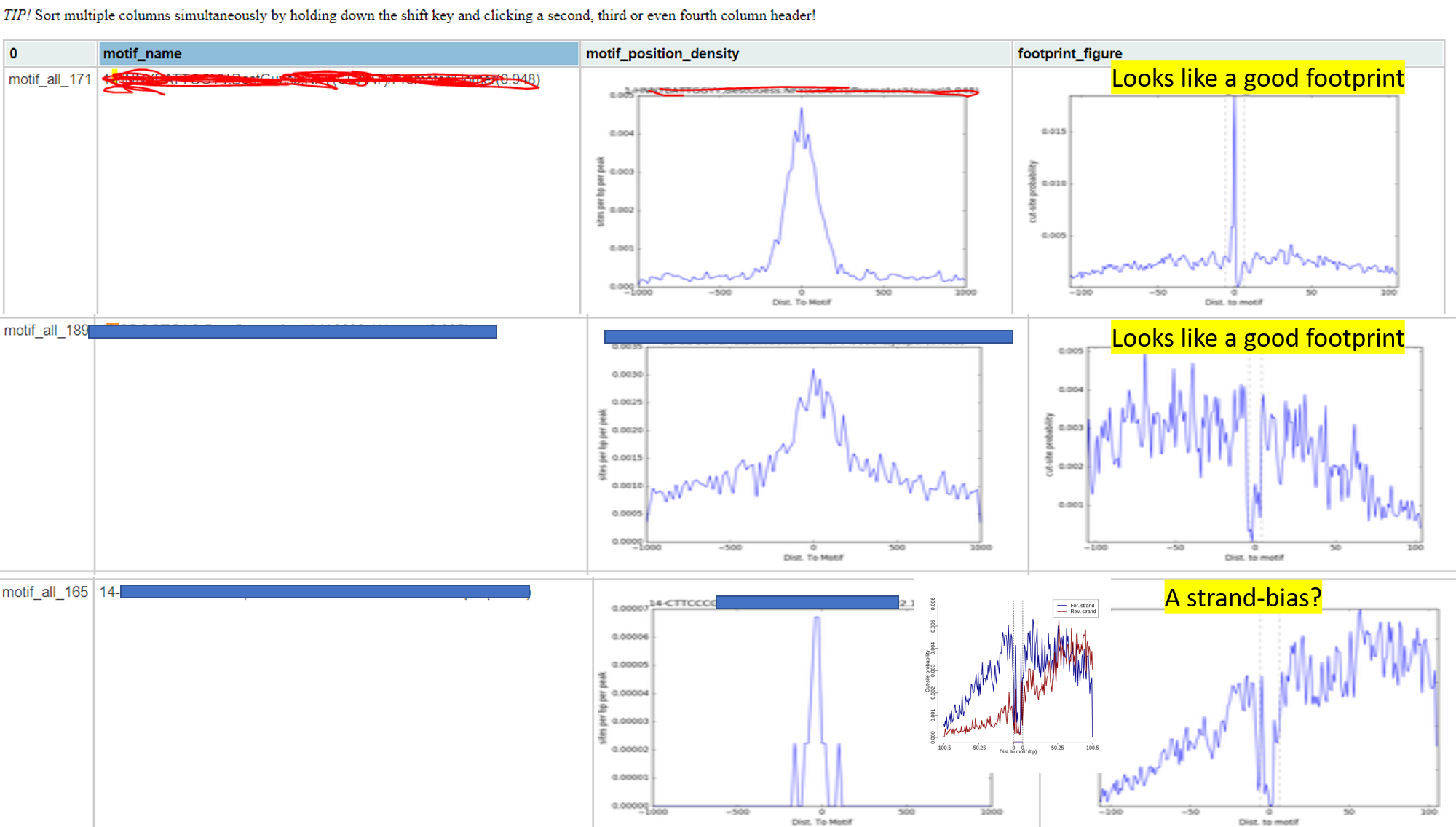
motif footprint HTML report (Main)
The html file is for quickly scanning through the results. For high-quality motif-occuring position density figures, go to homer_motifs_result/homer_all_motifs/*png. For high-quality motif footprint figures, go to motif_mapping/, here each motif has a folder, inside each folder, you will see footprint.lambda.strand_combined.png (this one is the figure in the html file). You can also find the footprint.png, which shows two strands cut-probability. Sometimes we can see strand differences, we are not sure how to explain this right now.
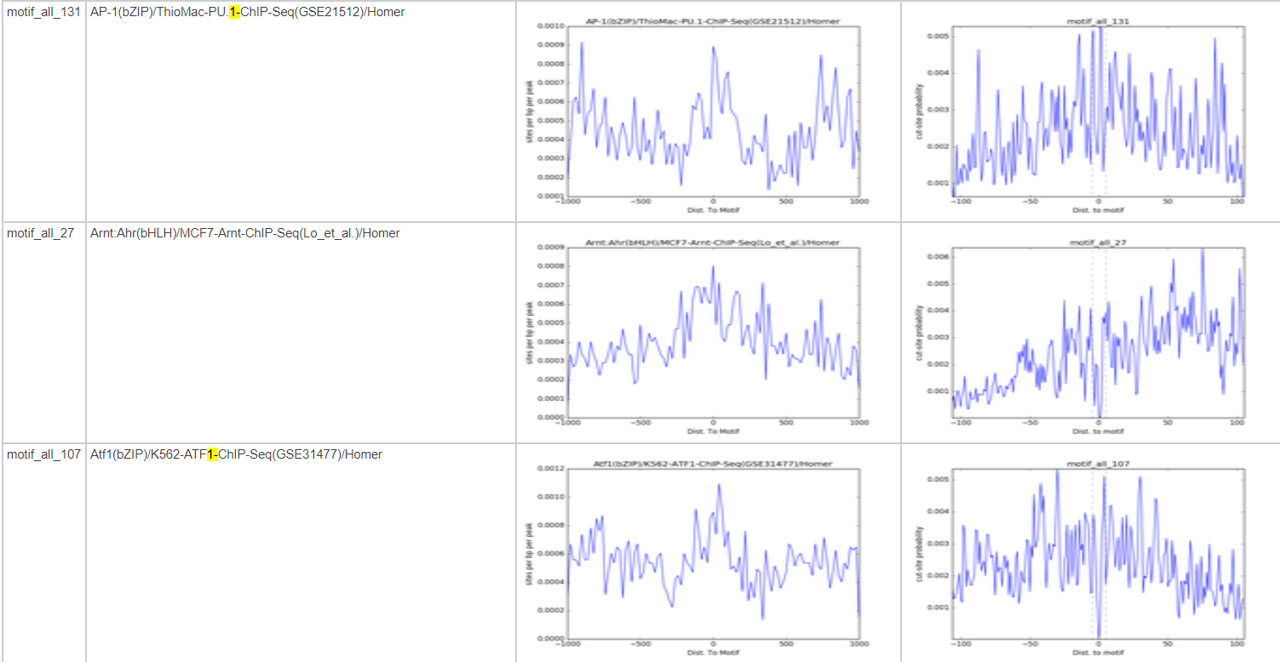
motif footprint HTML report (not good ones)
cut sites count (Main)
motif footprint - cut probability
You can also find footprint.png inside the motif_mapping folder, which shows two strands cut-probability.
More footprint figures for reference:
https://academic.oup.com/view-large/figure/84773029/btw209f1p.gif

https://www.biorxiv.org/content/biorxiv/early/2019/01/22/525808.full.pdf
Input
A tsv file specifying path_to_peak_file, path_to_bam_file, and output_file_prefix
Note
Please use absolute path.
An example is shown below:
/home/yli11/myPATH/test.narrowPeak      /home/yli11/myPATH/test.bam     test_out_name
/home/yli11/myPATH/banana.narrowPeak    /home/yli11/myPATH/banana.bam   banana_name
Usage
Go to your data directory and type the following.
Step 0: Load python version 2.7.13.
module load python/2.7.13
Step 1: Submit your job.
cut_run_footprint.py -f input.tsv
Multi-mapped reads may have MAPQ=0. If you want to keep it, use -q 0
cut_run_footprint.py -f input.tsv -q 0
If you only want to generate cut_sites.bw, use the following:
cut_run_footprint.py -f input.tsv -q 0 --only_cut_sites_bw
Output
You will receive a notification email when everything is finished.
An example of the output structure (inside job ID folder) is shown below, files that you might need are commented ##.
├── Banana
│   ├── bam_file
│   ├── cut_sites ## cut sites bw is here ##
│   ├── homer_motifs_result ## take a look at the homer results, e.g., p-values ##
│   ├── motif_mapping ## footprint figures are here ##
│   ├── output.html ## this report has been emailed to you ##
├── test_out_name
│   ├── bam_file
│   ├── cut_sites
│   ├── homer_motifs_result
│   └── motif_mapping
motif footprint - cut probability
Motif footprinting figure is shown inside the motif_mapping folder. One folder per motif name. You can look at the fimo.png file.
cut sites count
Cut sites bw file is in cut_sites folder.
Report bug
Go to your Job ID folder and do the following:
module load python/2.7.13

HemTools report_bug
Reference
https://bedtools.readthedocs.io/en/latest/content/tools/genomecov.html https://www.ncbi.nlm.nih.gov/pubmed/21106904
http://www.bioconductor.org/packages/release/bioc/vignettes/ATACseqQC/inst/doc/ATACseqQC.html
Pipeline script
install CENTEPEDE
wget http://download.r-forge.r-project.org/src/contrib/CENTIPEDE_1.2.tar.gz
R CMD INSTALL -l ~/R/3.5.1/ CENTIPEDE_1.2.tar.gz
=cut FT 1

inputFile=input_tsv

ncore=1
mem=16000


module load conda3/5.1.0
source activate /home/yli11/.conda/envs/cutruntools/
module load R/3.5.1
module load trimmomatic/0.36
module load java/1.8.0_60
module load meme/4.11.2
module load bedtools/2.25.0
module load bowtie2/2.2.9
module load picard/2.9.4
module load bedops/2.4.35
module load hdf5/1.10.4
module load perl/5.20.1
module load samtools/1.3.1
module load gcc/4.8.5
module load java/1.8.0_66


# Please give absolute path to file
peak_file=${COL1} #a narrowPeak file
bam_file=${COL2}
base=${COL3}
jid={{jid}}

pythonbin=/home/yli11/.conda/envs/cutruntools/bin
memebin=/hpcf/apps/meme/install/4.11.2/bin
bedopsbin=/hpcf/authorized_apps/rhel7_apps/bedops/install/2.4.35/bin
bedtoolsbin=/hpcf/apps/bedtools/install/2.25.0/bin
# genome_sequence=/home/yli11/Data/Human/hg19/fasta/hg19.fa
# samtoolsbin=/hpcf/apps/samtools/install/1.3.1/bin
# makecutmatrixbin=/home/yli11/Programs/cut_run_pipeline_Nan_Liu/git/atactk/scripts
# Rscriptbin=/hpcf/authorized_apps/rhel7_apps/R/install/3.5.1/bin
# extrasettings=/home/yli11/Programs/cut_run_pipeline_Nan_Liu
# motif_file=/home/yli11/Data/Motif_database/Human/human.meme

genome_sequence={{genome_fasta}}
samtoolsbin=/hpcf/apps/samtools/install/1.3.1/bin
makecutmatrixbin={{Liu_Nan_pipeline_path_atactk}}
Rscriptbin=/hpcf/authorized_apps/rhel7_apps/R/install/3.5.1/bin
extrasettings={{Liu_Nan_pipeline_path_root}}
motif_file={{motif_file}}

## not sure what this is for, but will keep it
pythonldlibrary=/home/yli11/.conda/envs/cutruntools/lib
ldlibrary=`echo $LD_LIBRARY_PATH | tr : "\n" | grep -v $pythonldlibrary | paste -s -d:`
unset LD_LIBRARY_PATH
export LD_LIBRARY_PATH=$pythonldlibrary:$ldlibrary

p=0.00050

echo "remove blacklist"
# blacklist=$extrasettings/hg19.blacklist.bed
blacklist={{black_list}}
cat $peak_file | grep -v -e "chrM" | $bedopsbin/sort-bed - | $bedopsbin/bedops -n 1 - $blacklist > $jid/"$base".filtered.narrowPeak

# cp $peak_file $jid/"$base".filtered.narrowPeak


$bedtoolsbin/bedtools getfasta -fi $genome_sequence -bed $jid/"$base".filtered.narrowPeak -fo $jid/"$base".fa
$pythonbin/python $extrasettings/macs2.narrow.aug18/fix_sequence.py $jid/"$base".fa


cd $jid
mkdir $base
cd $base
fimo_dir=motif_mapping
mkdir $fimo_dir
cd $fimo_dir
for m in `cat {{motif_list}}`; do
mkdir $m
echo $m
$memebin/fimo --verbosity 1 --motif $m --thresh $p --parse-genomic-coord -oc $m $motif_file ../../"$base".fa
$bedopsbin/gff2bed < $m/fimo.gff | awk 'BEGIN {IFS="    "; OFS="        ";} {print $1,$2,$3,$4,$5,$6}' > $m/fimo.bed
done


cd ..
dest=filtered.bam
mkdir centipede
outbam=centipede/$dest
#note that 1024 means read is PCR or optical duplicate
$samtoolsbin/samtools view -b -h -f 3 -F 4 -F 8 -F 1024 -o $outbam $bam_file #previous version
$samtoolsbin/samtools sort $outbam -o ${outbam}.sorted
mv ${outbam}.sorted $outbam
$samtoolsbin/samtools index $outbam
echo "finish samtools"

echo "plot footprint figures"
echo `pwd`
for i in `ls -1 $fimo_dir`; do #shows a list of motifs
echo "Doing $i..."
fimo_d=$fimo_dir/$i
tmp=`echo $i|cut -d "." -f3|wc -c`
mlen=$(( tmp - 1 ))
$makecutmatrixbin/make_cut_matrix -v -b '(25-150 1)' -d -o 0 -r 100 -p 1 -f 3 -F 4 -F 8 -q {{minMappingQuality}} $outbam $fimo_d/fimo.bed > $fimo_d/fimo.cuts.freq.txt
$Rscriptbin/Rscript $extrasettings/macs2.narrow.aug18/run_centipede_parker.R $fimo_d/fimo.cuts.freq.txt $fimo_d/fimo.bed $fimo_d/fimo.png $mlen
done

echo "generating bw file"
mkdir cut_sites
cd cut_sites
outbam=tcut_sites.bam
outbed=tcut_sites.bed
outbdg=tcut_sites.bdg
outbw=${COL3}.bw
chrom_size={{chrom_size}}

alignmentSieve --minMappingQuality {{minMappingQuality}} -b $bam_file -o  $outbam --filterMetrics metrics.txt --maxFragmentLength {{maxFragmentLength}} --shift 0 0
bedtools genomecov -ibam $outbam -g $chrom_size -bga -5 > $outbdg
bedGraphToBigWig $outbdg $chrom_size $outbw
rm $outbam
rm $outbed
rm $outbdg

=cut email 3 FT

module load python/2.7.13

cd {{jid}}

send_email_v1.py -m "{{jid}} is finished" -j {{jid}}
Comments
code @ github.